
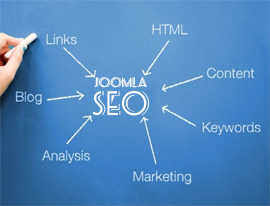
Joomla SEO: A Practical Guide to Improving Your Website’s Visibility
Joomla is a flexible content management system that provides a solid foundation for search engine optimisation (SEO). However, a well-built website will not automatically rank highly. To help search engines understand your content—and make it easier for people to find—you need to combine Joomla’s built-in features with good content, technical upkeep and a clear site structure.
This guide explains the essential steps for improving SEO on a Joomla website, from configuring search-friendly URLs to checking page speed and measuring results.
What is Joomla SEO?
Joomla SEO is the process of improving a Joomla website so that search engines can discover, crawl and understand its pages. It also involves making pages useful and accessible to visitors. The aim is not simply to attract more traffic, but to reach people who are looking for the products, services or information your site offers.
Some SEO settings are available in Joomla itself. Others depend on your template, hosting, extensions and the quality of your content.
Enable search-friendly URLs
Clear URLs help visitors understand what a page is about and can make a site easier to navigate. In Joomla’s global configuration, review the SEO-related settings and enable search engine-friendly URLs. Depending on your server setup, you may also be able to use URL rewriting to remove index.php from addresses.
Before changing URL settings, check your server requirements and Joomla documentation. If you change existing URLs, set up redirects from the old addresses to the new ones. Otherwise, visitors and search engines may encounter broken links.
Keep URLs concise and descriptive. Use words that reflect the page topic, and avoid unnecessary numbers, parameters or repeated keywords.
Organise content with categories and menus
A logical structure helps both visitors and search engines find their way around your website. Use Joomla categories to group related articles, then create menu items that make important sections easy to reach.
- Give categories clear, descriptive names.
- Keep important pages within a few clicks of the homepage.
- Use menu labels that accurately describe their destinations.
- Avoid creating large numbers of thin or overlapping categories.
Plan the structure before publishing lots of content. A clear hierarchy can make internal linking more effective and reduce the risk of creating pages that are difficult to find.
Write useful page titles and meta descriptions
Joomla lets you add metadata to articles and other parts of a site. Write a unique title for each important page, using language that accurately describes its content. Titles should be clear and appealing rather than packed with repeated search terms.
Meta descriptions provide a brief summary that may appear in search results. They do not guarantee higher rankings, but a relevant description can help people decide whether to visit your page. Keep it accurate, natural and specific to the page.
Also check the global metadata settings and review how your template displays page titles. Avoid using the same title and description across the entire website.
Create content that answers real questions
Strong SEO starts with content that meets a reader’s needs. Before writing, consider what someone searching for the topic wants to know, and make sure the page provides a useful, accurate answer.
- Use a clear main heading and descriptive subheadings.
- Explain specialist terms where necessary.
- Break up long sections with short paragraphs and lists.
- Include relevant examples, evidence or practical guidance.
- Review older content and update it when facts or services change.
Use search terms naturally. Repeating a phrase excessively can make content difficult to read and does not create a good experience for visitors.
Use headings and images thoughtfully
Headings help readers scan a page and show how its information is organised. Use one clear main heading, followed by subheadings in a sensible order. Do not choose a heading level just because it looks larger; visual styling should be handled by the template.
For images, use descriptive file names and meaningful alternative text when an image communicates information. Alternative text should explain the image’s purpose, not act as a place to insert extra keywords. Decorative images can usually be given empty alternative text so screen readers can skip them.
Compress images before uploading them and use suitable dimensions. Oversized files can slow down pages, especially on mobile connections.
Improve performance and mobile usability
Page speed and usability affect how people experience a website. Start by testing key pages on mobile and desktop, then look for issues such as slow-loading images, unnecessary scripts, layout shifts or difficult navigation.
- Choose reliable hosting that suits your site’s traffic and features.
- Keep Joomla, templates and extensions up to date.
- Remove extensions and template features that are no longer needed.
- Use caching and compression where they are supported and configured correctly.
- Check that text is readable and links and buttons are easy to use on small screens.
Make changes carefully and test the site after each update. Caching or optimisation settings can sometimes affect the appearance or functionality of a Joomla website.
Manage duplicate content and redirects
Duplicate or near-duplicate pages can make it less clear which version should appear in search results. This can happen when the same content is accessible through multiple URLs, or when several pages target almost identical topics.
Review your site for unnecessary duplicate pages and use canonical URLs where appropriate. When a page moves or is removed, redirect its old URL to the most relevant replacement. Avoid sending every deleted page to the homepage, as that may confuse visitors and search engines.
Choose extensions carefully
Joomla extensions can add useful SEO features, such as redirects, structured data or sitemap generation. Before installing an extension, check that it is actively maintained, compatible with your Joomla version and provided by a trusted developer.
More extensions do not necessarily mean better SEO. Each one can add maintenance requirements and may affect performance or compatibility. Use only the features your website needs, and keep extensions updated.
Support multilingual SEO
Joomla can be used to create multilingual websites, but each language needs a clear structure and properly connected translations. Check that visitors can switch between language versions easily and that translated pages contain genuine, high-quality content.
Review language settings, menu associations and any relevant language annotations. Do not rely on automatic translation alone for important pages; have translations checked by someone who understands the language and context.
Track progress and fix technical issues
SEO is an ongoing process. Use tools such as Google Search Console and analytics software to monitor which pages receive impressions and visits, identify crawl or indexing problems, and understand how visitors use the site.
Check important pages regularly for broken links, missing metadata, outdated information and indexing issues. When reviewing performance, look beyond rankings: relevant enquiries, sales, sign-ups or other meaningful actions may be better measures of success.
A Joomla SEO checklist
- Search-friendly URLs are configured correctly.
- Categories and menus create a clear site structure.
- Important pages have unique titles and useful descriptions.
- Content is original, accurate and written for visitors.
- Images are appropriately sized and have suitable alternative text.
- The website works well on mobile devices and loads efficiently.
- Redirects and canonical URLs are handled where needed.
- Joomla, the template and extensions are maintained.
- Search performance and technical issues are reviewed regularly.
Conclusion
Joomla provides many of the tools needed to build a search-friendly website, but successful SEO depends on how the whole site is planned, written and maintained. Start with a clear structure, helpful content and accurate metadata. Then improve performance, check technical settings and use reliable data to guide future updates.
By making steady improvements and keeping the needs of visitors at the centre of your work, you can help your Joomla website become easier to find, use and trust.
Top 5 Joomla SEO Tips for Enhanced Visibility and Performance
- Use clear, keyword-focused page titles and meta descriptions.
- Enable search-friendly URLs in Joomla’s Global Configuration.
- Organise content with descriptive categories and menu links.
- Add alt text to images and compress them for faster loading.
- Keep Joomla, templates and extensions updated for security and performance.
Use clear, keyword-focused page titles and meta descriptions.
Use a clear, unique page title that describes the page and includes its main keyword naturally, ideally near the beginning. Write a concise meta description that summarises the content and gives people a reason to click, rather than simply listing keywords. Accurate titles and descriptions help visitors understand what each page offers and can make your Joomla site more appealing in search results.
Enable search-friendly URLs in Joomla’s Global Configuration.
Enable search-friendly URLs in Joomla’s Global Configuration to make page addresses clearer and easier to read. Descriptive URLs help visitors understand what a page is about and can make your site easier to navigate. Keep them concise and relevant, and if you change URLs on an existing website, set up redirects so visitors and search engines can still find the pages.
Organise content with descriptive categories and menu links.
Organise your Joomla content into clear, descriptive categories and use menu links to help visitors find important pages quickly. Choose names that accurately reflect each section, group related articles together and keep the menu structure simple. A logical hierarchy makes your site easier to navigate and helps search engines understand how your pages relate to one another.
Add alt text to images and compress them for faster loading.
Add descriptive alt text to images so people using screen readers can understand what they show, and so search engines have useful context. Keep the text accurate and concise rather than filling it with keywords. Compress image files before uploading them to reduce file sizes without noticeably affecting quality; this can help pages load faster, particularly on mobile devices.
Keep Joomla, templates and extensions updated for security and performance.
Keeping Joomla, your template and all extensions up to date is an important part of maintaining a secure, reliable website. Updates often fix security vulnerabilities, resolve bugs and improve compatibility or performance. Regularly check for updates, back up your site before applying them, and test key pages and features afterwards to make sure everything still works as expected.